Meet Ren, your AI assistant
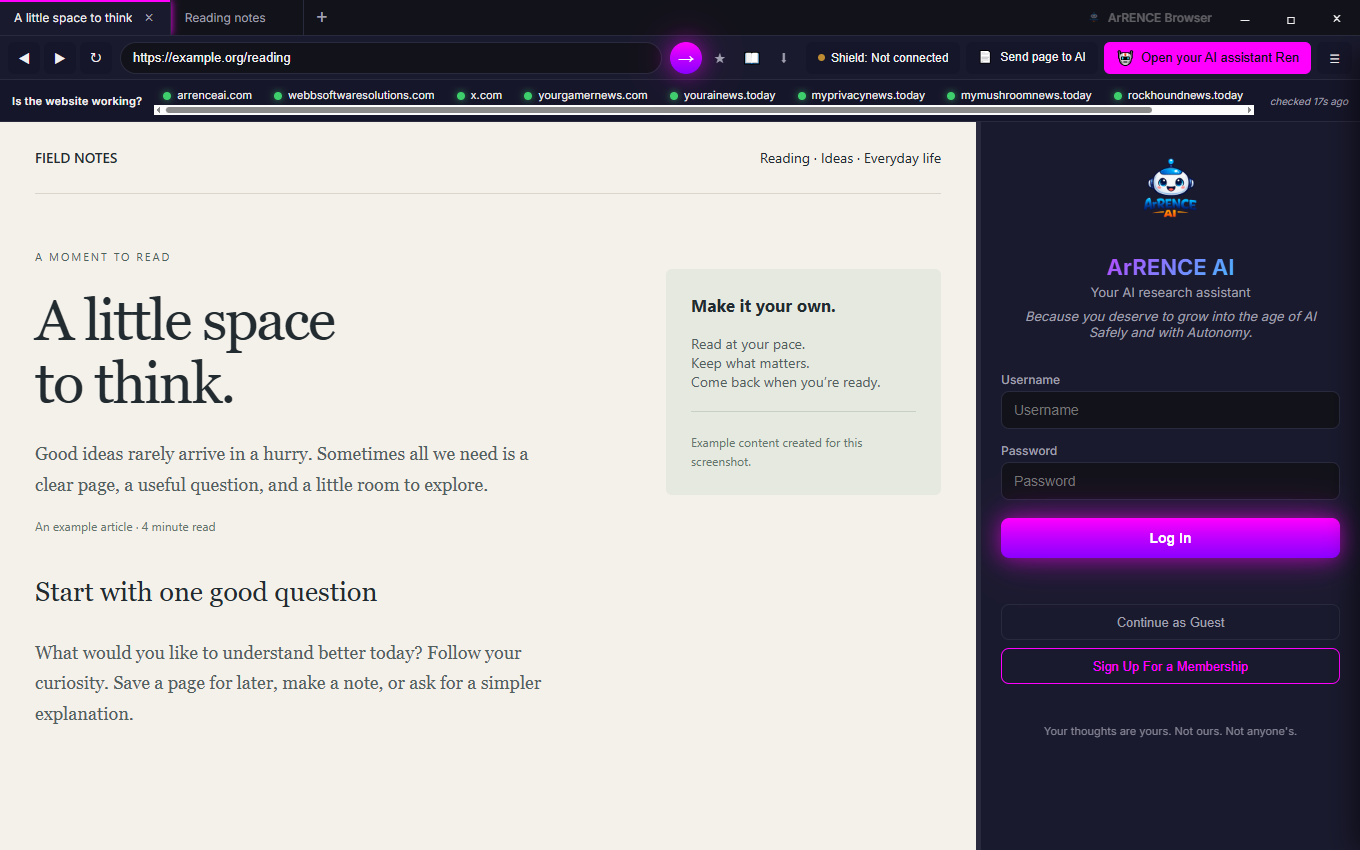
Ask questions, pull out key points, or get a plain-language explanation in the side panel. Share a page with Ren when you choose to use an AI feature.
 ArRENCE Browser
 · Windows
Your everyday browser, with Ren by your side. Read, ask, explore—and add a little extra peace of mind with Webb Computer Shield.
Built-in ad & tracker blocking. AI help when you ask.
A little less friction
Keep the everyday essentials close, with a few thoughtful extras when you need them.
Ask questions, pull out key points, or get a plain-language explanation in the side panel. Share a page with Ren when you choose to use an AI feature.
Built-in ad and tracker filtering helps reduce distractions. Blocking settings stay under your control.
Tabs, saved sessions, bookmarks, history and downloads keep your everyday browsing organized. Background tabs can sleep to save resources.
Use summaries, available YouTube transcripts, or Find on this site to get to the information you need. Video summaries depend on transcript availability.
Choose from four themes and an OpenDyslexic reading option. Zoom and familiar browser controls help you get comfortable.
See the “Is the website working?” links beneath your address bar. Optional YouTube auto-skip uses the Skip Ad button when it is available.
A browser with a companion
Connect Webb Computer Shield to add local checks for suspicious fullscreen warnings—especially those pushing you to call, pay, or allow remote access.
Browser sends warning signals to Shield, which can help you review what is happening and request an exit from fullscreen or close the observed tab. You choose the response.
Meet Webb Computer Shield ↗ArRENCE BrowserYour web & AI assistant Computer ShieldYour local safety companion
A local connection on your computer.
No page text, URLs, images, or history are sent to Shield.
No. ArRENCE Browser works on its own. Shield is an optional companion that adds local desktop monitoring and checks for suspicious fullscreen patterns. Each app has its own Microsoft Store listing.
Page content is sent to the AI service when you choose an AI feature, such as Send page to AI. Shield page checks are separate: when enabled, visible-text warning signals are assessed locally. See the privacy statement.
Private-session Shield checks are off by default and have their own opt-in setting. Private browsing does not make you anonymous to the websites you visit or your network provider.
No tool catches every scam. Shield’s page checks look for patterns, especially in visible English fullscreen warnings. Image-only content, unusual wording and other languages can be missed. Keep Windows and your antivirus up to date, and pause before sharing money or remote access.
You can browse the web without using the AI assistant. AI services may have separate account or subscription requirements. Review the current options in the app.
Make room for a better browsing day
For Windows x64. Install and manage updates through Microsoft Store.